



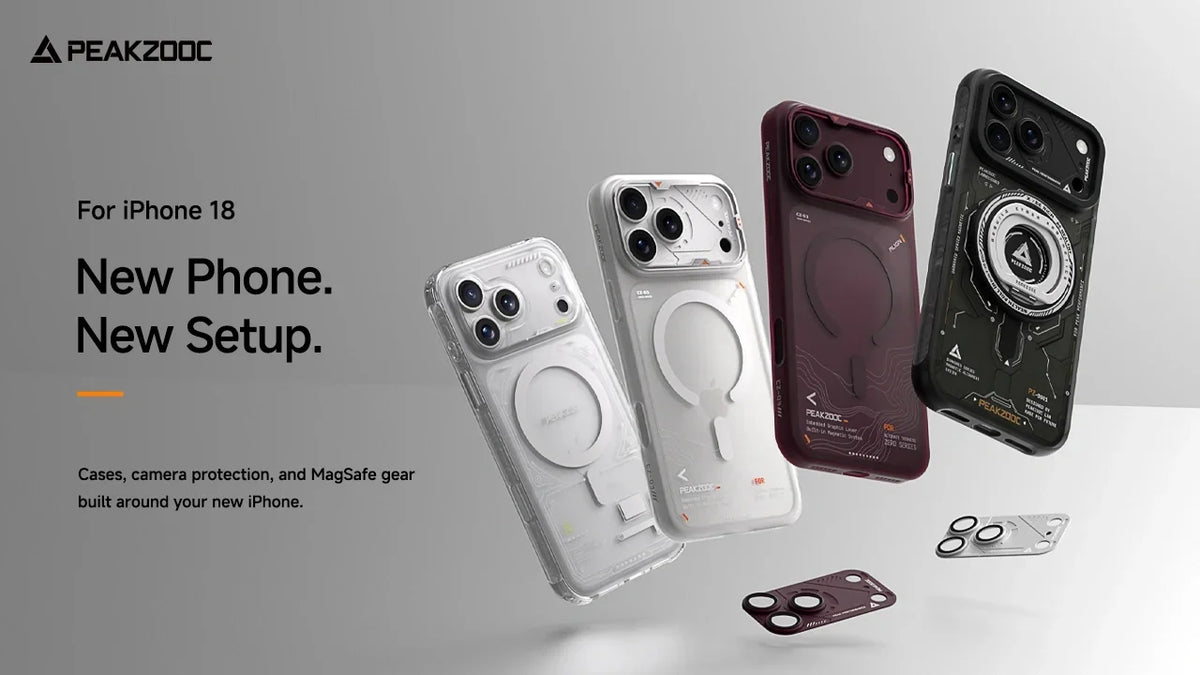
Getting a new iPhone is exciting. You remove it from the box, set up your apps, transfer your photos, and start exploring the new features.
But once the initial excitement wears off, one question usually comes up:
How do you want to carry and use it every day?
Your phone goes almost everywhere with you. It sits on your desk, travels in your pocket, joins you on weekend trips, and becomes part of your everyday routine.
That is why choosing the right iPhone 18 Pro accessories is about more than finding a protective case. The right setup should match your style, protect the parts you use most, and make your daily routine a little easier.
At Peakzooc, we look at phone accessories as part of a complete everyday carry system. Here is how to build a setup around your new iPhone 18 Pro or iPhone 18 Pro Max.
1. Start With the Right iPhone 18 Pro Case
Your phone case is the foundation of your setup.
It affects how your phone feels in your hand, how it looks on your desk, and how easily it works with other accessories. Instead of choosing a case based only on appearance, think about how you actually use your phone.
Do you prefer a clean and lightweight setup? Do you want a more technical look? Or would you rather show off the original design of your iPhone?
Peakzooc offers three different case styles for different everyday preferences.
Dark Grid Series: For a Technical Look
The Dark Grid Series phone case is designed for users who prefer a more structured, technical aesthetic.
Its graphic surface and industrial-inspired details give the phone a distinctive appearance without adding unnecessary decoration. It is a natural fit for an EDC setup built around metal accessories, mechanical details, and a darker desk environment.
Choose Dark Grid if you want your iPhone to feel like part of your everyday gear rather than just another smartphone.

Best for:
Technical aesthetics, EDC enthusiasts, and users who prefer a bold visual identity.
Zero Series: For a Minimal Setup
Not everyone wants a visually complex phone case.
The Zero Series phone case focuses on a clean appearance and a slim profile. It is designed for users who prefer to keep their everyday carry simple while still having MagSafe compatibility.
If you usually carry only the essentials and dislike bulky accessories, Zero Series is a natural starting point.
It works especially well with a minimalist desk setup, a small everyday bag, or a pocket-focused carry system.

Best for:
Minimalists, lightweight carry enthusiasts, and users who prefer a clean look.
Neuron Series: For a Futuristic Look
The Neuron Series Phone Case takes a different approach.
With its translucent design and visible structural details, it brings a more futuristic and industrial character to your phone. Instead of hiding the design beneath a solid exterior, it makes the case itself part of the visual experience.
It is a good choice if you enjoy technology-inspired design and want your iPhone to stand out without using an overly colorful case.

Best for:
Tech enthusiasts, futuristic setups, and users who want a more visible design.
2. Protect the Camera You Actually Use
The camera system is one of the most important parts of your iPhone.
Whether you are taking travel photos, recording short videos, or capturing everyday moments, the camera is often the feature you use most. It also sits on the back of the phone, where it can come into contact with desks, bags, and other surfaces.
A phone case protects the body of your device, but it does not necessarily provide the level of protection you want around the camera lenses.
That is where a dedicated camera lens protector can be useful.

PRISM ARMOR: Add Protection Around the Camera
The PRISM ARMOR Integrated Aluminum Camera Lens Armor combines an aluminum ring with tempered glass protection.
Its design is intended to work with the overall appearance of your phone case instead of looking like a separate add-on. The black frame pairs particularly well with Dark Grid and other darker accessories, while the metallic construction complements Peakzooc’s industrial design language.
For users who regularly place their phone on desks, carry it in a bag, or take it outdoors, camera protection is a practical addition to an iPhone 18 Pro setup.
A complete setup should protect more than the phone’s back. The camera deserves attention, too.

3. Make Your Phone Easier to Carry
A phone is not always most convenient when it is inside your pocket.
When you are walking around a city, traveling, attending an event, or carrying several other items, having quick access to your phone can make a difference.
The RANGER Series Phone Lanyard is designed around this idea.

RANGER Series: More Than Just a Phone Strap
The RANGER Series phone lanyard combines two carrying options in one system.
You can use it as a longer crossbody-style strap when you want your phone close at hand, or switch to a wrist strap when you prefer a shorter carry option.
Its quick-release design makes it easier to remove the phone when you need to use it without the strap getting in the way.
This type of setup can be useful for:
- Traveling and sightseeing
- Festivals and outdoor events
- Shopping and commuting
- Taking photos while moving around
- Everyday carry when you want quick access
The point is not to add another accessory to your pocket. It is to make your phone easier to carry in situations where a pocket is not always practical.
Best for:
Active daily routines, travel, outdoor use, and users who prefer flexible carrying options.
4. Complete Your Setup With MagSafe Accessories
A good phone case protects your device. A good everyday setup should also make the phone easier to use.
MagSafe accessories can help turn your iPhone into a more flexible tool at home, at work, or on the go.
ZO-01 Dual-Fold MagSafe Grip Stand
The ZO-01 Dual-Fold MagSafe Grip Stand combines the functions of a phone grip and a small stand.
It can help make your phone more comfortable to hold while also providing a convenient way to position it on a desk or another flat surface.
It is especially useful when you are:
- Watching videos
- Taking hands-free calls
- Checking notifications
- Using your phone beside your computer
- Taking quick photos
Its compact design also makes it a practical addition to a travel-oriented setup.
[Add internal link: ZO-01 MagSafe Grip Stand]
Swivel MagSafe Stand: For Your Desk
If your phone spends a lot of time on your desk, a dedicated stand can make your setup more organized.
The Peakzooc Swivel MagSafe Stand features a rotating base that allows you to change the viewing angle of your phone.
It can be used while checking messages, following a recipe, monitoring notifications, or keeping your phone visible during work.
Pair it with a Peakzooc desk setup, a keyboard display stand, or an aluminum monitor riser to create a more consistent workspace.
Your phone does not have to disappear into a pocket or lie flat on your desk. Give it a place in your setup.
5. Choose Accessories That Work Together
The best iPhone 18 Pro setup is not necessarily the one with the most accessories.
It is the one where each item has a clear purpose and works well with the rest of your gear.
Here are three possible combinations to consider.
The Minimal Setup
For users who prefer a clean and lightweight carry:
- Zero Series Case
- PRISM ARMOR Camera Lens Armor
- ZO-01 MagSafe Grip Stand
This combination keeps the setup simple while adding camera protection and more flexible phone handling.
The Technical EDC Setup
For users who prefer an industrial and structured look:
- Dark Grid Series Case
- PRISM ARMOR Camera Lens Armor
- RANGER Series Phone Lanyard
- Swivel MagSafe Stand
This setup brings together protective details, flexible carrying options, and a more technical visual style.
The Futuristic Everyday Setup
For users who enjoy showing off the design of their device:
- Neuron Series Case
- PRISM ARMOR Camera Lens Armor
- RANGER Series Phone Lanyard
- ZO-01 MagSafe Grip Stand
This combination focuses on visible design details, flexible carry, and practical MagSafe functionality.
6. Build Your Own iPhone 18 Pro Setup
There is no single perfect iPhone 18 Pro case or accessory combination for everyone.
Some users want the lightest possible setup. Others prefer a more structured EDC system with stronger visual character. Some carry their phones mainly in a pocket, while others need quick access throughout the day.
Start with the way you use your phone.
Choose a case that matches your style. Add camera protection where it matters. Consider a lanyard if you need more freedom when carrying your phone. Then complete the setup with MagSafe accessories that make your daily routine more convenient.
Your iPhone is already an important part of your everyday life.
Your accessories should work the same way.
Explore the Peakzooc For iPhone 18 Collection and build a setup that fits your everyday carry.


